01 Report design
Brilliant reports,
by default.
A calm canvas. Context beside every KPI. One clear question per page. A design system that gives the numbers room to speak.
02 The page has a job
Five questions.
Five deliberate layouts.
Start with the reader's decision. Select qualified measures, then choose the page that can answer the question.
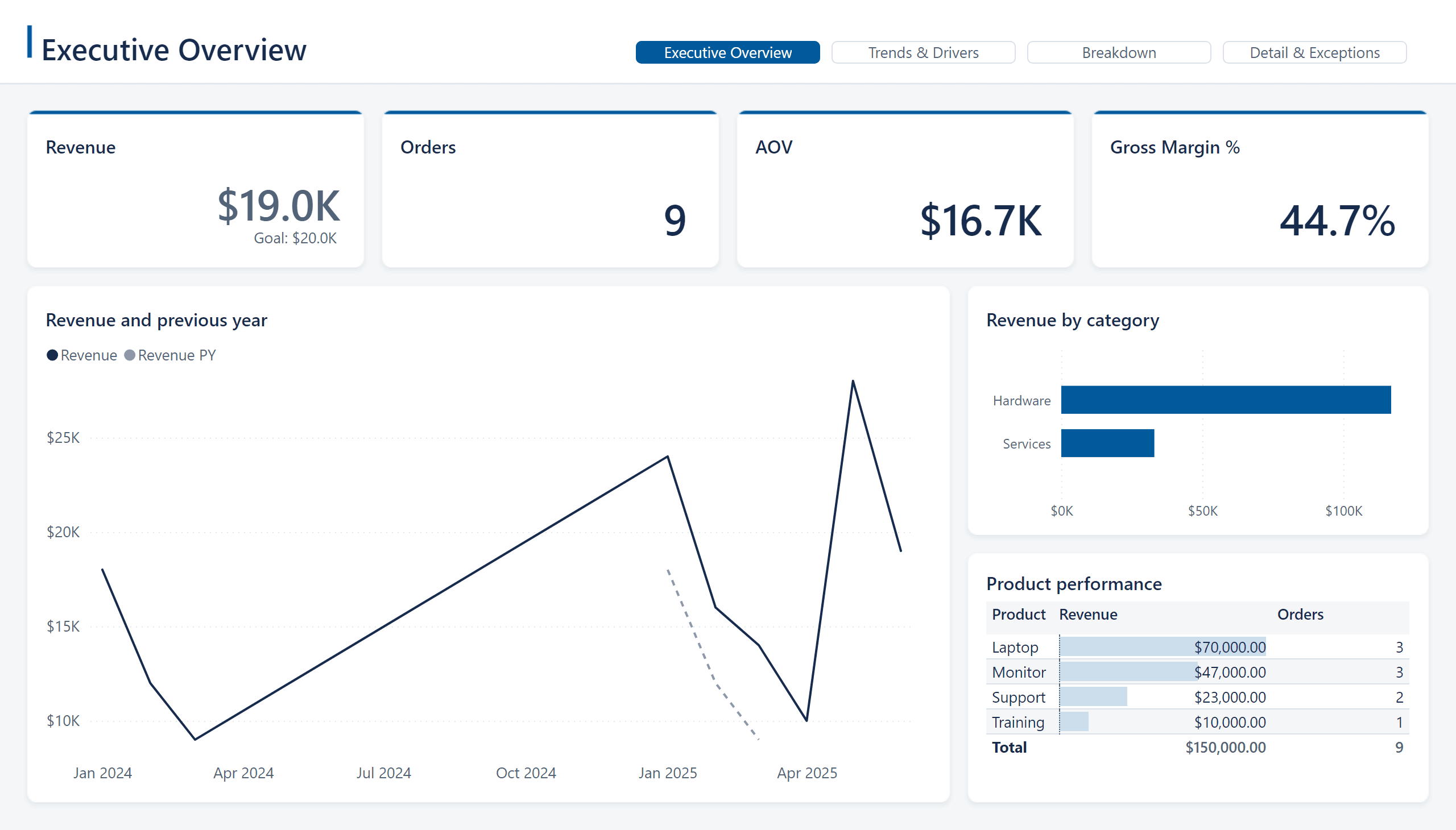
Executive overview
Are we succeeding, and where must we act?
No valid time? Use a ranked comparison. No exception predicate? Call the queue Top contributors.
- K1–4
- Outcome, two drivers, guardrail · native KPI / card
- A
- Outcome history · line chart, actual vs comparison
- B
- Impact ranking · clustered bar
- C
- Action queue · top five exceptions table
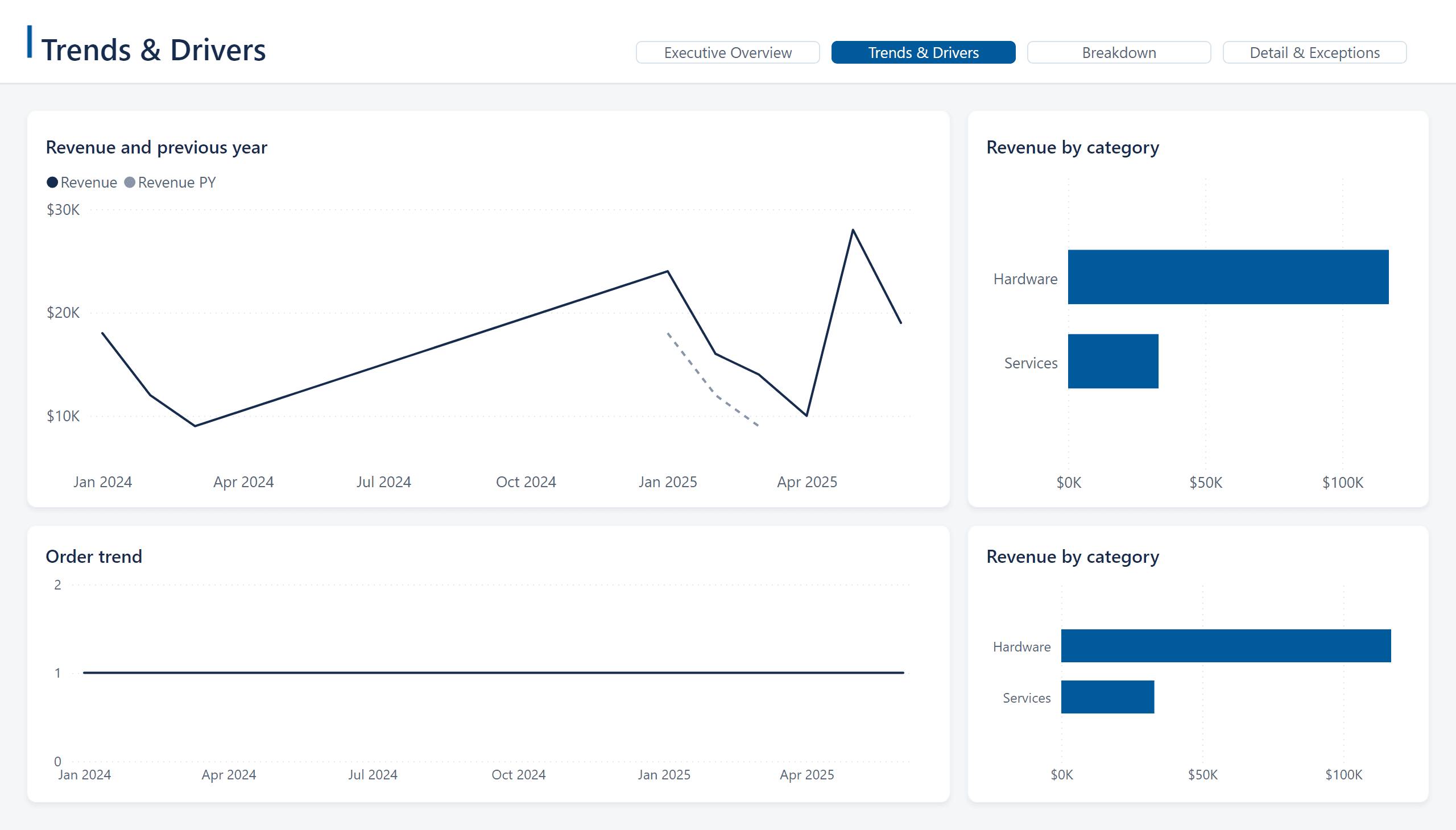
Trends & drivers
When did it change, and which segments moved?
Keep the metric and calendar consistent with Overview. Shared scales support comparison; paired volume/rate questions may justify a labelled combo chart.
- A
- Primary trend · line chart with qualified comparison
- B
- Monthly variance · clustered column
- C
- Segment trends · line chart small multiples, up to four
- D
- Selected driver · ranked clustered bar
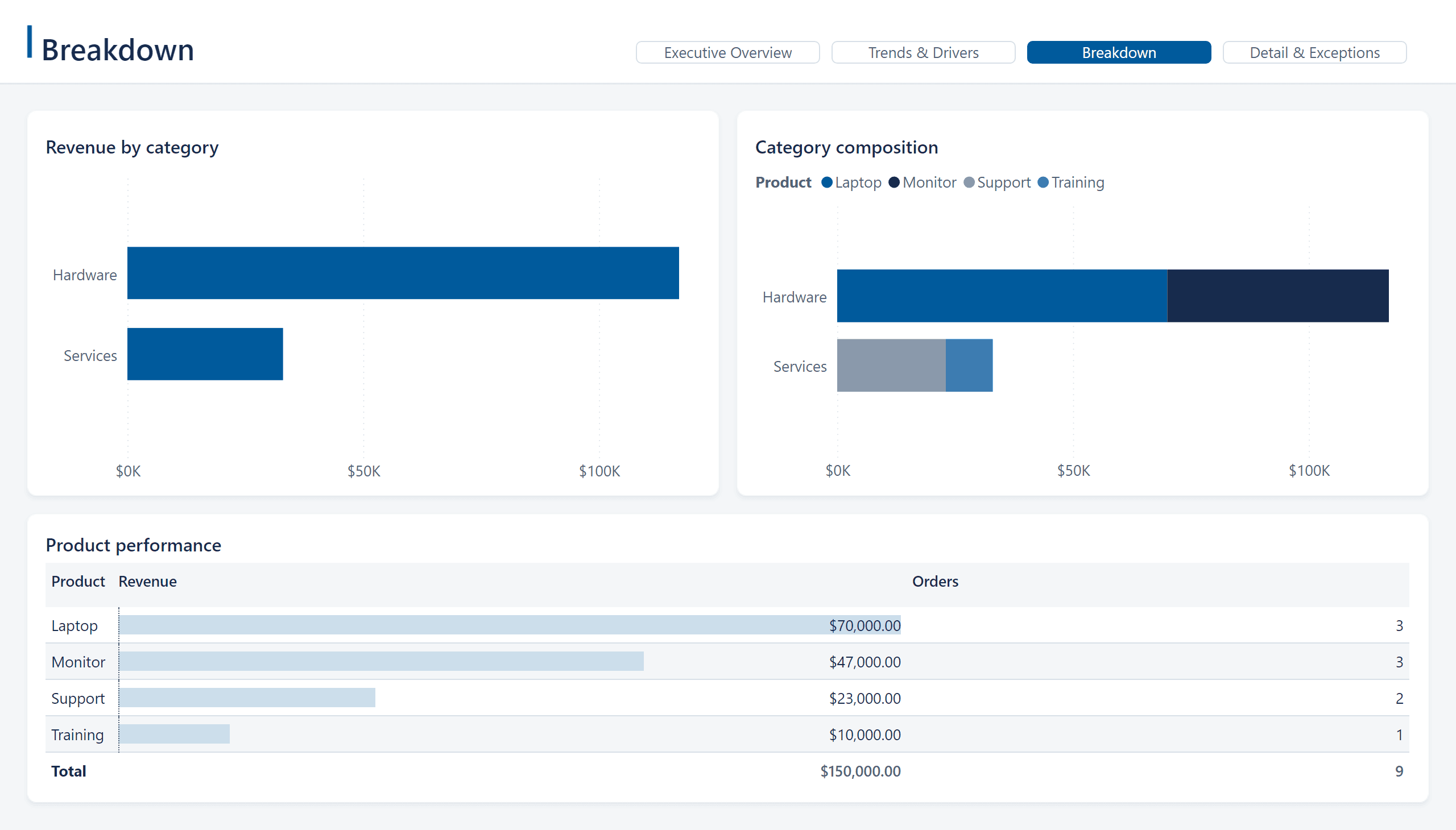
Breakdown
Where does the result come from?
Composition needs exclusive additive parts. Use ranked comparisons for overlapping or non-additive measures. A waterfall needs explicit, reconciled bridge inputs.
- A
- Contribution ranking · clustered bar, Top 10 + valid Other
- B
- Composition · stacked or 100% stacked bar
- C
- Category × organisation · Matrix with data bars
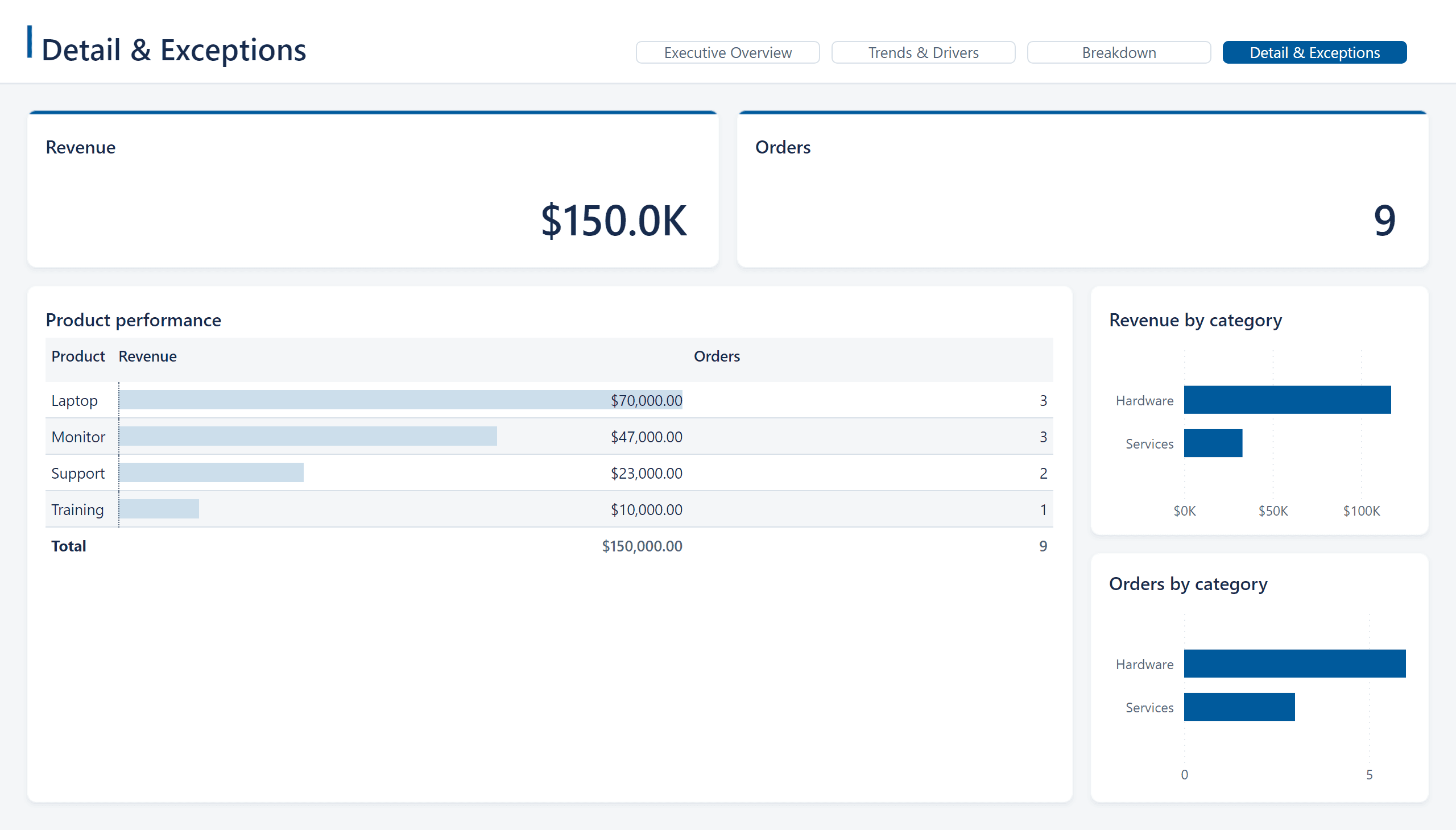
Detail & exceptions
Which records require action?
Define the exception predicate. Without one, use Detail and omit invented exception metrics. Keep entity, date, owner/status and comparison columns readable.
- K1–4
- Population, exception count, exception rate, exposure
- A
- Actionable detail · Matrix, or table for a flat queue
- B
- Severity / status · clustered bar
- C
- Aging · clustered column in business order
Drillthrough
What happened to this entity?
Hidden from normal navigation. Inherit filter context, require one entity and retain a live Back control in the header.
- I
- Identity · native text / card, one entity required
- K1–2
- Entity outcome and governed risk / health KPI
- A–B
- Entity history · line chart; context · Matrix / table
- C
- Supporting transactions · authorised detail table
Fictional sample data and verification marks. The gallery illustrates the desktop schematic; a production report needs a separately designed and qualified mobile layout. Missing evidence produces a fallback, an omitted optional slot or a refusal.
The default reading path is Overview → Trends & Drivers → Breakdown → Detail & Exceptions. Drillthrough is contextual and hidden from ordinary navigation. These schematics show the brilliant-v1 design contract; v2 CLI integration remains in preview.
03 Rendered, not drawn
The same schematic,
live in Power BI.
The spine generated this report from a semantic model alone: layout, theme, canvas, visuals and navigation. These are service exports, not mockups.
Fictional demo data. Exported from the Power BI service through the spine's own deploy and export path.
04 More than a big number
A KPI should tell
the whole comparison.
Outcome, two actionable drivers and a guardrail. Show fewer when evidence supports fewer. Never duplicate measures to fill the row.
↗ Favourable · higher is better
- 1Identity + periodName the measure, unit and selected period. Separate data-through time from refresh time.
- 2Headline valueUse the qualified measure and its numeric format. Right-align tabular Segoe UI numerals.
- 3Named baselineShow target, plan, PY or previous period and its value. Otherwise say Baseline unavailable.
- 4Variance + governed statusDistinguish absolute change, relative change and percentage points. Polarity must be explicit; unknown is neutral.
- 5Qualified trendUse up to 12 chronological observations and name the window. Otherwise say Trend unavailable.
Native semantics first. Use a native KPI when qualified Indicator, TrendLine and Goal fields support the intended latest-point meaning. Otherwise use the new card's Data role, then the classic card's Values role. Companion text or trend visuals must be supported and counted toward the page cap.
Make unavailable states explicit. A missing baseline is not zero. Relative change is N/A for a zero or negative baseline unless a governed formula exists. Rates use percentage points where appropriate. An absent comparison or trend must stay visibly unavailable.
05 brilliant-v1
A frame with
room to think.
Whole-pixel geometry gives each view a consistent hierarchy. The layout engine computes placements; report visuals and artwork use the same map.
White radius-8 panels have subtle depth. KPI tiles carry a 3px accent top rule. Native visual containers stay transparent, without borders or shadows. Header navigation sits left of compact slicers; keep period and principal business scope visible.
06 Quiet colour. Clear meaning.
Designed to be read.
Segoe UI throughout the report. Dark ink for actuals, dashed grey for comparison, and governed teal or orange status with text and symbols.
A clear business question.
Visual title · 12pt semibold
Labels, axes, tables · 10pt
$2,840,000
Actual — solid ink
Prior year - - dashed comparison + dark markers
Ratios are computed against opaque white panels. Report text requires 4.5:1; essential graphics require 3:1. Comparison grey is 2.91:1: add a contrasting boundary or dark markers and labels, or provide accessible native detail. Dashing identifies a scenario; it does not raise contrast. Additional-series blue is 4.4466:1 before rounding and fails the text threshold. Divider and surface colours are decorative.
The series order is #005A9C, #172B4D, #8A99AB, #3E7CB1, #B8C4D0, #526477. The pale #B8C4D0 fill is 1.77:1 on white and needs a dark boundary when essential. Unknown polarity uses neutral #526477. A positive variance alone does not establish favourable performance.
07 The canvas is an artifact
Artwork that aligns
by construction.
The actual spine-generated PNG below draws the static frame. Values, labels, dates, filters and selected states belong in the live report layer.
Generated backgrounds and v2 CLI composition are being finalized.
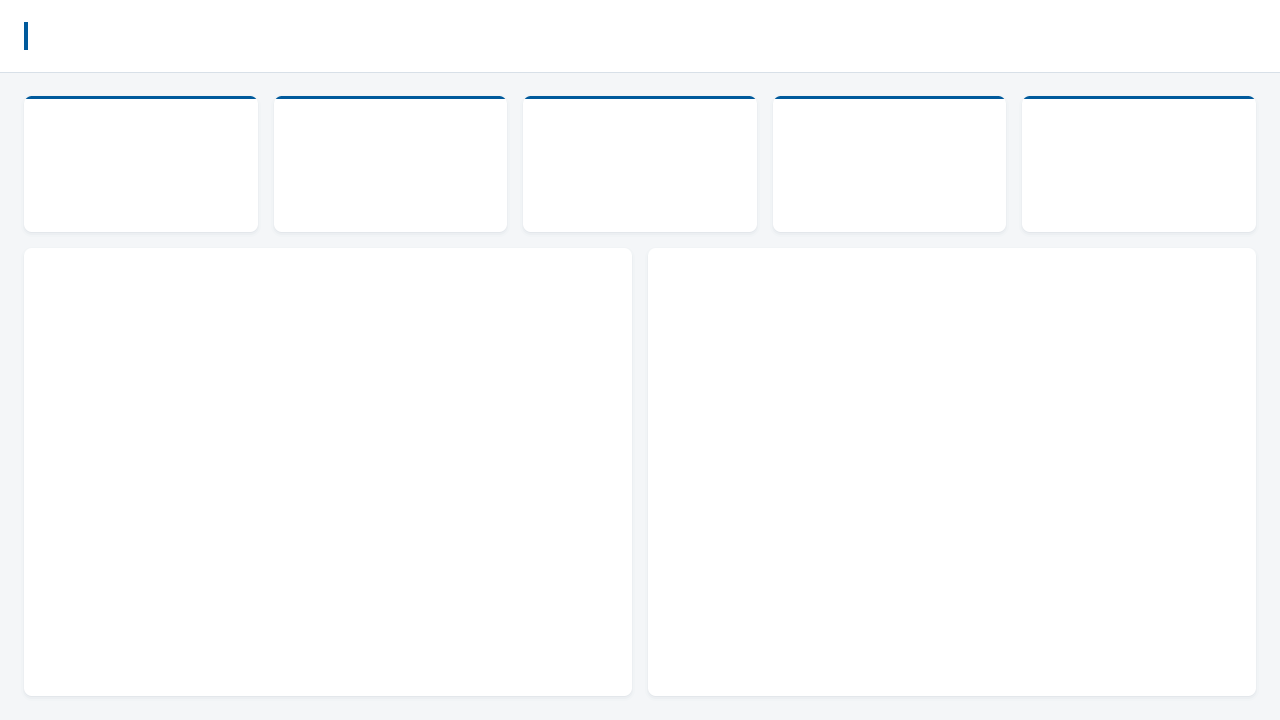
The deterministic renderer uses the final placements and shared tokens. Its PNG encoding has no timestamps or font dependency. At 1× the asset is 1280×720; 2× is 2560×1440. Apply it as Canvas background with Fit and 0% transparency. Wallpaper does not define the report canvas.
A designer can own the artwork.
Marp, Figma or PowerPoint can produce a registered canvas. The editable source stays with the image and its placement compatibility record.
- Start from the final placement manifest and token versions.
- Use a 1280×720 frame and the exact panel rectangles. Export PNG at 1× or 2×.
- Register the local image with its digest and compatibility record. The v2 presentation selection is
background.mode: registered. - Validate actual PBIR and resources. Inspect Desktop, service and required exports. Re-export and requalify whenever placements or tokens change.
Marp is an optional designer tool. The automatic renderer does not require it. Figma uses a 1280×720 frame; PowerPoint uses 16:9 and pixels ÷ 96 for inch positions.
Excerpt · brilliant-v1 Marp canvas template
.accent-rail {
  position: absolute;
  left: 24px;
  top: 22px;
  width: 4px;
  height: 28px;
  background: #005A9C;
}
.tile { top: 96px; width: 296px; height: 136px; }
.k1 { left: 24px; }
.k2 { left: 336px; }
.k3 { left: 648px; }
.k4 { left: 960px; }
.hero { left: 24px; top: 248px; width: 811px; height: 448px; }
Static shapes only. The image must not contain values, meaningful titles, active filters or selected navigation. A designer export does not become the source of report coordinates.
08 Make good defaults reviewable
Some checks are structural.
Some need a person.
The design contract separates validator-enforced requirements from render, semantic and interaction review. Missing evidence remains unverified.
Validator-enforced · design contract
Count it. Bind it. Check it.
- Page budget. At most six logical KPI cards, eight data slots, twelve rendered data visuals and three header slicers. Companion trends count.
- KPI context. Named baseline or an explicit unavailable state. Governed polarity and declared text/icon. Distinguish percentage points and relative percentages.
- Visual policy. No default pie or donut. Declare ranking, chronological sort and business order. Bar and column axes include zero; dual axes name their units.
- Reconciliation evidence. Top-N coverage, Other and waterfalls need valid retained evidence. Profiles support exceptional visual choices.
- Geometry and legibility. Bounds, overlap, 1px snap, 16px gutters and declared font/column budgets. No essential text below 10pt.
- Accessible metadata. Explicit contrast, alt text, reading order and decorative/navigation metadata.
- Background identity. Current geometry and tokens, safe registration and bound image/manifest. Assets above 1MB fail background policy.
Guidance · human + observed review
Read it. Render it. Use it.
- Business semantics. Do not sum snapshots across dates, average displayed rates or mix units. Review the definitions against an independent oracle.
- Actual labels. Inspect baseline, variance, status, sort and axes in the host. Check font fallback, clipping, native KPI endpoints and blank/zero behaviour.
- Visible accessibility. Check actual contrast, monochrome, screen readers and keyboard use. Avoid essential hover-only content and decorative keyboard stops.
- Useful interactions. Exercise Reset, cross-filtering, selected/focus states, drillthrough context and Back. A link target alone proves no behaviour.
- Artwork and export. Look for baked-in meaning. Review transparent containers, panel edges and required PDF/PowerPoint exports.
- Independent mobile design. A desktop canvas shrunk to fit is not a qualified mobile report.
- Numerical proof. Layout and design checks do not qualify displayed values. Bind actual queries and rendered observations to their exact report state.
Validator-enforced describes the machine-checkable design contract, including declared metadata and retained evidence where available. It is not a claim that every installed version implements every check. The preview report.design.valid family is separate from the eight layout rules. Business and visual acceptance remain yours.
09 Free learning path
Learn to design
the decision.
Work through KPI hierarchy, page archetypes, deterministic geometry and the difference between a readable report and a qualified number.
The free course is part of the proposed academy. Publication and learning availability remain staged.